Local control, no cloud
Bulbs are discovered directly on your Wi-Fi/LAN with the LIFX UDP protocol and controlled with millisecond latency. No account, no internet required.

Luxel is a native GNOME app that runs your LIFX smart bulbs and SmartLife/Tuya smart plugs right on your network — no phone, no cloud account. Group lights into rooms, save scenes, and dial in the perfect color or warm white.
Everything you need to run your LIFX bulbs and SmartLife plugs from the desktop — fast, local, and without the bloat.
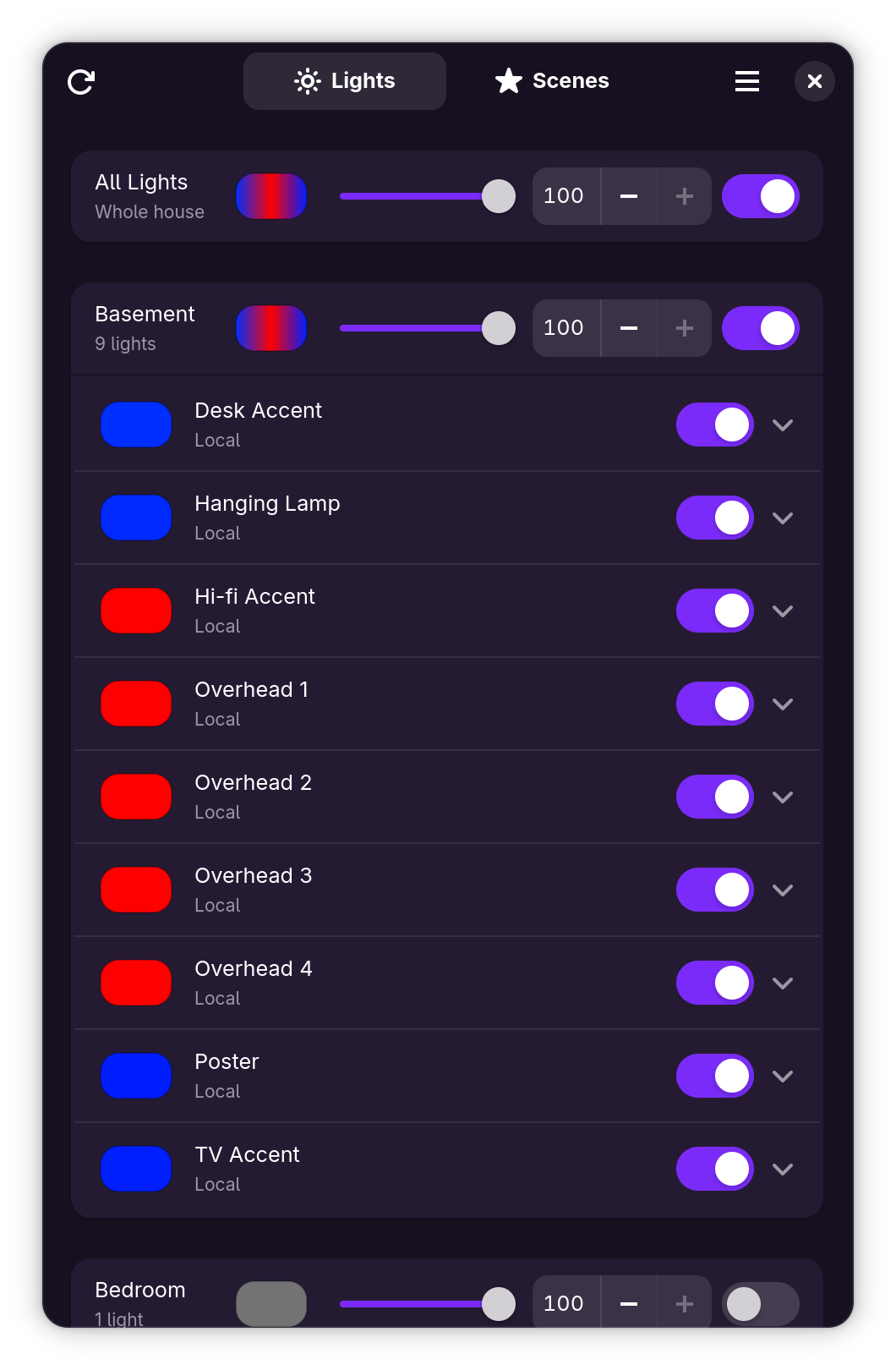
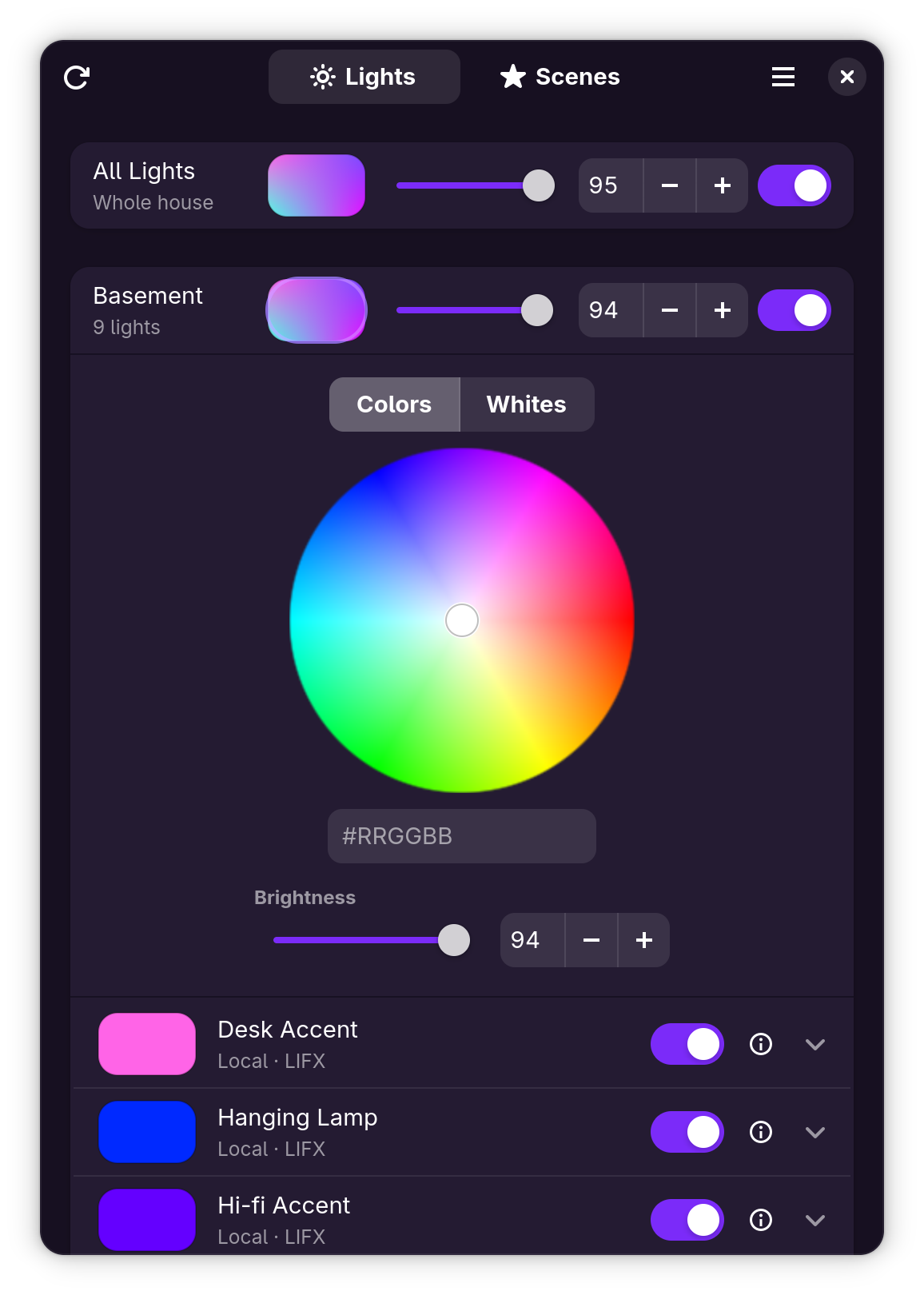
Bulbs are discovered directly on your Wi-Fi/LAN with the LIFX UDP protocol and controlled with millisecond latency. No account, no internet required.
Built in Rust with GTK4 & libadwaita. Instant startup, buttery sliders, and an interface that feels right at home on GNOME.
Bulbs are grouped into room sections automatically from their LIFX group — or assign any bulb to a different or brand-new room.
A LIFX-style hue & saturation wheel — white at the center, colors toward the rim — plus an RGB hex entry for exact shades.
A color-temperature slider from candlelight to daylight (1500–9000 K), a typed kelvin entry, and the live LIFX shade name — Incandescent, Daylight, and friends.
Every room header has its own color button, power switch, and brightness slider — and an “All Lights” row drives the entire house at once.
Save the current state of your lights under a name and restore it with one click — choosing exactly which lights each scene includes. Stored locally, no cloud needed.
Changed a light from the LIFX app or a physical switch? Luxel notices and updates automatically — and bulbs gray out when they’re unreachable.
Every bulb gets its own power switch, brightness slider, and a Colors / Whites mode toggle — simple things stay simple.
Bulbs and plugs on a separate subnet or VLAN? List their subnets in Settings and Luxel probes them with directed broadcast and a unicast sweep that routes across VLANs.
Tuya-based plugs from the SmartLife app work right alongside your bulbs — controlled entirely over your LAN with an ON/OFF chip, rooms, scenes, and the All Lights switch included.
A built-in wizard walks through the one-time Tuya key setup, fetches your devices automatically, and finds them on your network — even across VLANs. After that, the cloud is never needed again.
Add a personal access token to list and control lights through the cloud — handy away from home. When a bulb is reachable both ways, local control always wins.
Rescan with Ctrl+R, open Settings with
Ctrl+,, quit with Ctrl+Q — plus full
keyboard navigation and a shortcuts dialog, the GNOME way.
Local-first
Luxel talks straight to your bulbs and plugs over your own LAN. No account to create, no data harvested, nothing phoning home. Your home stays home.
No analytics, no tracking, no “anonymous usage data.” None.
Discovery and control run over your LAN. Cloud use is strictly opt-in — a one-time key fetch sets up SmartLife plugs — and local control is always preferred.
The Flatpak asks for network access and nothing else — no filesystem access, no devices, no surprises.
Luxel is released under the GNU AGPLv3.
Most of Luxel's code is written with Anthropic's Claude — directed, reviewed and tested by a human maintainer who signs off on every release. The artwork is human-made. And the app itself contains no AI: no AI features, no requests to AI services — it talks only to your lights and smart plugs on your own network. Read the full AI notice →
Guides, setup, and reference — coming soon.
Install it, hit rescan, and your lights are on your desktop.
Recommended: working GPU drivers (OpenGL / Mesa), ~4 GB RAM, and a GNOME-style desktop — though it runs fine on KDE and others. Uses ~1.1 GB for the shared GNOME runtime (reused across your Flatpak apps) plus a few MB for Luxel itself. A LIFX Cloud personal access token is only needed if you opt into cloud control, and SmartLife plugs need a free Tuya developer account once during setup — the in-app wizard walks you through it.
Fedora, RHEL, and their relatives (Rocky, Alma, CentOS Stream, Nobara, Silverblue…) ship GNOME and Flatpak with Flathub already enabled. There’s nothing to set up. Just install Luxel:
flatpak install --from https://luxel.hyprlab.co/flatpak/io.github.hyprlab.Luxel.flatpakref
The Fedora KDE (Plasma) spin ships Flatpak with Flathub enabled, and Luxel runs happily outside GNOME — libadwaita apps look and work great on Plasma. Just install it:
flatpak install --from https://luxel.hyprlab.co/flatpak/io.github.hyprlab.Luxel.flatpakref
Ubuntu doesn’t enable Flatpak or Flathub by default (its App Center is Snap-based), so add Flatpak support and GNOME Software’s Flatpak backend first. You only do this once.
sudo apt install flatpak gnome-software-plugin-flatpak
flatpak remote-add --if-not-exists flathub https://flathub.org/repo/flathub.flatpakrepo
flatpak install --from https://luxel.hyprlab.co/flatpak/io.github.hyprlab.Luxel.flatpakref
Linux Mint already includes Flatpak with Flathub enabled, so Luxel installs out of the box — click Install Luxel above, or run:
flatpak install --from https://luxel.hyprlab.co/flatpak/io.github.hyprlab.Luxel.flatpakref
Zorin OS is GNOME-based and ships Flatpak with Flathub already configured. Luxel installs and runs with no extra setup. Just install it:
flatpak install --from https://luxel.hyprlab.co/flatpak/io.github.hyprlab.Luxel.flatpakref
Found a bug or have a feature idea? The best way to reach the project is to open an issue on GitHub. Please search existing issues first, then include your Luxel version, your distro and desktop, and the steps to reproduce.
Luxel is free and open source. If it brightens your smart light experience, please consider supporting its development at the link below. Thank you!
Luxel is distributed as a Flatpak — the standard, safe way to install apps on Linux. It works on every distro. Pick whichever way is easiest.
Click below to get Luxel’s install file (a small .flatpakref).
Then open the downloaded file — double-click it, or click it
in your browser’s downloads bar. Your app store (GNOME Software, KDE Discover,
and most others) takes over and installs Luxel for you.
First time using Flatpak? You may need to set it up for your distro first — a one-time step that takes about a minute. If double-clicking the file doesn’t open your app store, use the terminal method below instead.
flatpak install --from https://luxel.hyprlab.co/flatpak/io.github.hyprlab.Luxel.flatpakref
Press Enter, then type y when it asks you to confirm.
flatpak run io.github.hyprlab.Luxel.